
Before the Building Exists: Turning Architectural Renders into a Luxury Property Concept Film with AI
A sales gallery can be ready before the house is. The entrance, the living room, and the terrace already exist as approved renders. The stone is specified, the oak is specified, the late light has been argued over in a lighting study. Marketing does not yet have a building that can be walked on camera. A buyer still needs the sequence: arrival, threshold, room, view. The ridge house used here is a hypothetical set for that job: an eye-level entrance, a west-facing living room, a terrace beyond the same glazing, a material board, and a late-afternoon lighting frame. No site photography. Construction not started.
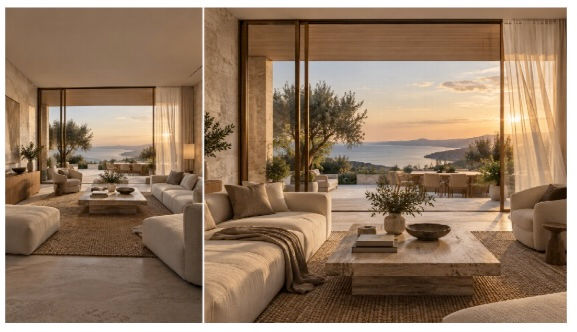
AI-generated editorial concept: architectural visualization and a cinematic presentation of the same luxury interior.
The visualization studio holds the signed views. The interior team holds the material board and the lighting reference. Marketing needs a short film for a client meeting, a broker preview, or a page beside the stills. The practical place to assemble those files is a Seedance 2.5 AI video generator, where the approved stills, the material board, and the lighting frame can enter one generation instead of being redescribed from memory. Images decide the building. The prompt decides the walk.
What each approved view is for
Treat the render set as the drawing package for the film. The entrance locks the door, the surround, the stair, and the approach. The living room locks the seating, the glazing, the floor, and the fireplace against the window wall. The terrace locks the parapet, the outdoor furniture, and the direction of the outlook. The material board locks limestone, oak, metal, and textile, so those surfaces stay specified when the camera moves. The lighting frame locks the hour and the color of the bounce, so the film does not quietly become noon.
Seedance 2.5 AI is built to keep those roles apart. In one pass it can take up to 30 images, 10 video clips, and 10 audio clips as reference material. A three-view house does not need that ceiling. What it buys is a named job for each file: architecture on the approved views, material and color on the board, light on the study. “The stone” then points at a crop, and “the room” points at the signed living room.
On Seedance AI, image-to-video is the tight opening. The output follows the first frame, so the arrival can begin on the approved entrance rather than on a cousin of it. Reference is the better path once the film has to carry more than one room: a new clip guided by the attached views, with the prompt assigning what each image is allowed to contribute. Edit and Extend come after that first pass, when a beat is close and should be adjusted rather than discarded.
A massing model for the walk
If the studio already has a textureless model of the approach, that file is the camera brief. Seedance 2.5 AI can take a clay render as a reference for spatial structure, subject path, shot-size changes, and camera angle, while a separate image carries materials, lighting, and color. Point the white model at the push and the hold. Point the finished entrance render at the stone, the door, and the stair.
That split is how a 3D reference helps an unbuilt house. The marketing team can lock eye height and a straight approach by showing the path on the massing. The approved renders still supply the facade, the furniture, and the glazing. A previs clip can lend pace only: rhythm from the clip, architecture from the stills. The lighting frame remains the source for the hour.
One continuous pass from door to terrace
The film marketing actually needs is short and joined. Seedance 2.5 AI can generate up to 30 seconds in one pass, and inside that window it can organize more than one connected shot, so arrival, room, and terrace follow as one piece. That length covers a hold on the door, a drift along the seating, and a settle on the view.
Write the camera as a limit, one move per beat. Eye height. A slow approach to the door, then a hold long enough to read the surround. A move through the threshold into the living room, then a lateral drift along the seating. A quiet pan on the terrace toward the outlook already drawn. No second subject, and no figure added for life. The same hour of light, taken from the lighting frame. The same limestone and oak, taken from the board.
Aspect ratio is the screening choice. A meeting room usually wants 16:9. A story cut wants 9:16, with the door and the view kept central. Seedance 2.5 AI offers 16:9, 9:16, 1:1, 4:3, 3:4, and 21:9. Image-to-video keeps the first frame’s ratio. An edit or an extension keeps the ratio of the clip it continues. Pick the frame before the first generation, and for a gallery wall use the highest resolution that entry exposes.
A prompt written like a shot list
The prompt below is a working pattern for the ridge-house set. It assumes the five stills are attached and tagged in order.
References. @Image1 approved entrance, eye level. @Image2 approved living room, same scheme. @Image3 approved terrace. @Image4 limestone, oak, metal, and textile board. @Image5 late-afternoon light, warm bounce, no extra fixtures.
Instruction. Use only the architecture in @Image1, @Image2, and @Image3. Keep facade, door, stair, glazing, furniture placement, and parapet as drawn. Materials and color from @Image4. Light from @Image5. No people, no text, no logo.
0–8 seconds. Start on @Image1. Slow push toward the entrance at eye height. No orbit. Hold on the door and stone surround.
8–18 seconds. Move through the threshold into @Image2. Slow lateral drift along the seating, then a still hold. Do not add or remove furniture. Do not change window proportions.
18–28 seconds. Continue to the terrace in @Image3. Quiet pan toward the view, then settle. Same hour of light. Soft exterior air at the door, quiet room tone inside, a faint terrace breeze. No music. No voice.
If a clay model is in the stack, add one line at the top: camera path, pacing, and shot-size changes from @Clay1; surfaces, furniture, and color from the approved images. The timed beats stay the same. The massing steers the walk. The renders steer the house.
Changing one beat without redrawing the house
The first pass is for the sequence. The second pass is for a named correction. Seedance 2.5 AI offers timestamp-level control for targeted edits of picture and sound, plus reference-based editing, so a chair that has migrated can be sent back to the approved living-room still. Edit reworks the attached clip and stays close to its length. Point at the span, point at the still, and name the restoration.
A usable edit note for the ridge house, if the sofa has shifted between the tenth and sixteenth second:
At 10–16 seconds, restore the sofa, oak floor, and window proportions from @Image2. Keep the camera path, the light direction, and the rest of the frame.
Camera-perspective editing is the adjustment when the room is right and the move is not. A push that has crept above eye line can be brought back to the height blocked on the massing. The facade, the furniture, and the hour stay on the same files.
Extend is how the terrace gets its settle if the first pass spends its time on the door and the room. The control continues the clip from its last frame, and a further round can append the next beat: begin on that frame, resolve on @Image3, and attach the material board and the lighting frame again. The join is the same stone and the same hour.
Sound that belongs to the hour
Seedance 2.5 AI generates audio with the picture, on the same multimodal pass. The generator includes an audio option, and an audio reference can guide atmosphere when a specific room tone matters. For this cut, the useful track is quiet: soft air at the door, a low room tone inside, a faint breeze on the terrace, matched to the beats already written. A sales-gallery edit can still lay a licensed score over the picture afterward. The team can watch the walk before that score exists.
The cut in the meeting
The film has a direct next use. In a design review it plays the approved sequence for the architect and the client: door, room, outlook, in one pass. In a broker preview it gives the stills a pace the listing page cannot. In a deck it sits beside the entrance, living room, and terrace renders, so a buyer can watch the approach and then inspect the signed frame. A 9:16 story cut can follow from the same reference stack once that meeting version has been accepted.
For the next broker preview, prepare a 16:9 version that begins at the entrance and ends on the terrace. Keep the approved living-room render beside the film in the presentation, then generate a vertical companion with the doorway and outlook centered. The same limestone, oak, warm light, and gentle room sound give both cuts a recognizable identity as the property campaign moves from the sales gallery to a mobile screen.


