
Face Swap Video Free: A Practical Guide to Making Fun Clips Online
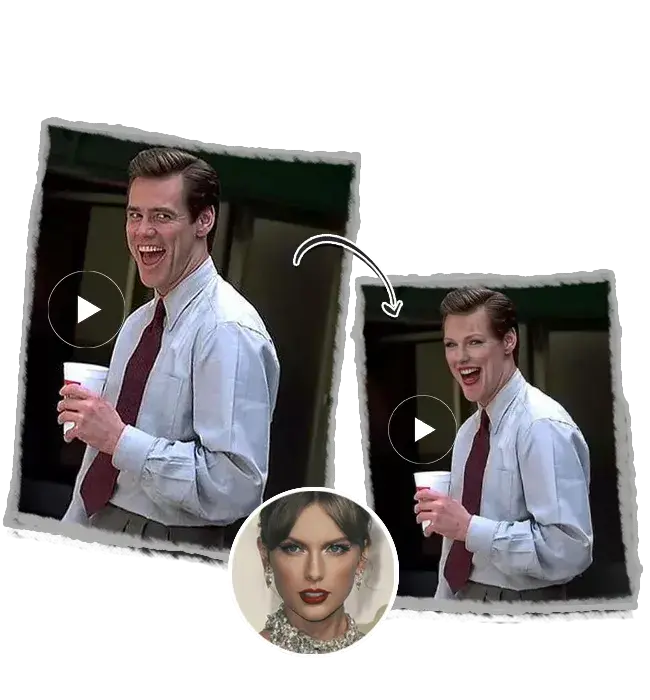
Not long ago, putting one person's face into somebody else's video needed patience, powerful software and a decent grasp of editing. Most people simply didn't bother. Now a phone, a clear selfie and a few spare minutes are often enough to get a passable result. A group of friends planning a surprise for a mate's thirtieth can make a short clip during their lunch break and still have time for a sandwich. That shift has opened up a whole new kind of playful creativity. It has also raised fair questions about how such tools are used.
Why Free Online Tools Took Off
Price was always the biggest barrier. Professional editing suites cost money, demand powerful computers and take weeks to learn properly. Browser tools removed all three hurdles in one go. Someone searching for a face swap video free option today usually wants exactly that: no download, no subscription and no steep learning curve. A student sharing a cramped laptop with a sibling won't want a heavy program clogging it up. A web page that does the job and then closes neatly suits that situation far better.
Social media did the rest. Short-form platforms reward quick, funny and surprising content, and face swaps tick every box. A clip of a grandad's face on a breakdancer's body can travel round a family group chat in minutes. Reactions arrive almost instantly, usually in the form of crying-laughing emojis. That instant feedback keeps people coming back for another go. Laughter is a powerful motivator, after all.
Meet AIFaceSwap
AIFaceSwap is a free online face swap app that can be used with no login. It supports single-person face swapping, multi-person face swapping and video face swapping, so users can enjoy the fun of AI face swapping simply by uploading a photo. Its dedicated Video face swap page sits alongside a photo tool and a GIF tool, plus options for batch swaps and even animal faces. A family wanting the dog's face on a Christmas card and a reel of the uncle as a pop star could, in principle, find both in one place. That variety is a big part of the appeal. Few people enjoy juggling several websites for one evening's fun.
What the Free Tier Includes
Free access comes with sensible limits. According to the site's FAQ, free users get three face swap videos a day, and each clip has a time limit. The page also says results carry no watermark, which matters to anyone planning to share the finished clip. A university society making a single promo video for freshers' week would fit comfortably within that allowance. Heavier users, such as creators posting every day, can pay for credits or a plan that lifts the daily cap. Most casual users never get near the ceiling.
Formats and File Limits
The technical details are clear enough. The video tool accepts MP4, MOV and M4V files, while the face photo can be JPG, PNG or WEBP. Uploads can be as large as 1GB, and the page says up to six faces can be swapped in a single clip. A wedding party wanting all six groomsmen turned into film heroes for the speech could therefore manage it in one go. Processing takes a little while, with the FAQ estimating about three to four minutes for a ten-second clip. That's roughly the time it takes to boil the kettle and pour a cup.
Making a Face Swap Video Step by Step
The process is short and fairly forgiving. The page lists four steps: upload the video, upload a face image showing a clear face, crop the clip to the part that needs changing and then press render. A busy mum preparing a joke clip for her sister's hen night could get through it while the pasta boils. Once the clip is ready, it can be downloaded and shared straight away. Signing in unlocks a history of past creations, though that history is cleared after two days for free users. Saving favourites promptly avoids any disappointment.
Cropping deserves a special mention. Choosing only the few seconds that really matter keeps processing faster and makes the joke sharper. A football fan putting a mate's face onto a famous goal celebration only needs the moment the ball hits the net. Everything before that is just waiting. Short and punchy usually wins on social media.
Getting the Best From a Free Face Swap Video
Photo quality is the single biggest factor. A bright, sharp picture with the face looking straight at the camera gives the software the clearest map to work from. Sunglasses, heavy shadows and hands over the face confuse it badly. A teenager who uses a holiday snap squinting into the sun may end up with oddly narrow eyes in the final clip. Swapping that photo for one taken by a window usually fixes the problem. Good light is free, and it works wonders.
Angles matter too. If the person in the target clip spends most of the time looking to one side, a source picture shot from a matching direction usually blends more smoothly. Fast movement, flashing lights and very dark scenes all make tracking harder. A clip filmed at a lively nightclub will often produce a wobblier swap than one filmed in a calm garden. The technology is clever, but it isn't magic. Picking an easy clip saves a lot of frustration.
Trying a few versions pays off. Making a Face swap video is rarely perfect on the first attempt, and small changes in photo or clip choice can lift the result noticeably. A sister prepping a surprise for a sibling's graduation might try four snaps before one finally clicks. That trial and error is part of the fun. It also turns a quick joke into something rather polished.
Creative Ideas That Work Well
Celebrations are the classic use. Birthdays, retirements, weddings and leaving parties all benefit from a cheeky clip that puts the guest of honour in an unexpected role. A retiring postman shown as a Hollywood action hero will almost certainly get a cheer at the pub. Personal touches like that make people feel seen and appreciated. They also tend to be remembered long after the cake is gone.
Content creators find other uses. Comedy accounts use swaps for sketches, while small businesses sometimes use them, with permission, in light-hearted promotional posts. A local bakery might swap the head baker's face onto a superhero to announce a new doughnut flavour. The post feels warm and personal rather than corporate. Customers like seeing real faces behind a brand, even when those faces are wearing capes.
Using Face Swaps Responsibly
Fun only stays fun when everyone involved is happy. The site's FAQ makes consent a condition of use, so every face in a clip needs its owner's agreement, and it rules out fraud, impersonation, political misinformation and anything featuring children. Those rules are there for good reason. A colleague who agreed to be swapped into a dance video will usually laugh along. Someone who had no say may feel humiliated, and that's no joke at all.
Privacy is another sensible concern. According to the site, files people upload serve only to create the swap, stay away from outside parties and get wiped automatically inside a day. A parent trying the tool with a family clip will probably feel easier knowing that. Even so, using clips with no sensitive details in the background is a wise habit. A house number or school badge visible in a corner can reveal more than intended.
Labelling helps keep audiences on side. A short caption noting that a clip was made with AI removes any confusion about what is real. A comedy page that does this consistently tends to earn loyal followers rather than angry comments. Honesty and humour sit together quite happily. Viewers enjoy a trick far more when they're in on it.
Final Thoughts
Free face swap tools have made a once-expensive effect available to almost anyone with a browser. Platforms such as AIFaceSwap keep the process short, the limits clear and the results shareable without a watermark. The best clips still depend on human choices, from a good photo to a kind idea and a clear caption. A spare ten minutes and a willing friend are often all it takes. The software supplies the trick, but the people involved supply the laughter.


