
USA's Top 13 Standing Desks for Home Office with Best Cable Management (2026)
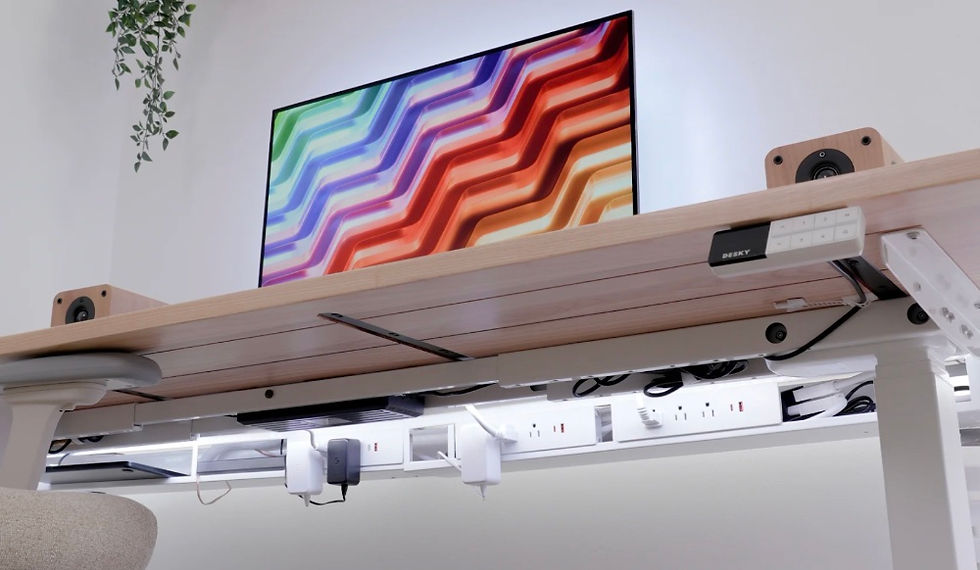
Cord clutter ruins a perfectly good home office setup. Comparing 13 electric standing desks on built-in cable management, tray capacity, and real-world cord control, the Desky Dual Sit Stand Desk claimed the top spot for home office professionals in the US. Desky pairs a removable cable tray with integrated cable channels in the frame itself, keeping power bricks, charging cables, and monitor leads hidden during both sit and stand positions.
Most standing desks move fine but leave cables dangling. For home office workers running dual monitors, a laptop dock, and multiple USB peripherals, unmanaged cables create visual chaos and real tripping risk. This list covers the 13 best options across every price bracket, rated specifically for how well each desk handles the daily cable load of a home office setup.
What Makes a Standing Desk Great for Cable Management?
Home office cable management for a height-adjustable desk requires more than a clip or a zip tie. The desk needs to handle movement cleanly every time the surface rises or falls.
Built-in cable tray or channel mounted under the desktop surface
Adequate slack management so cables never pull taut at full height
Frame routing to keep vertical cable runs hidden from view
Power strip compatibility inside the tray for a single-cord exit to the wall
Anti-snag design that protects cables from pinch points during height adjustment
Desks that skip these features force users to rig their own solutions with adhesive clips and cable sleeves, which rarely look clean and rarely hold up.
Side-by-Side: 13 Standing Desks for Cable Management
# | Brand | Built-in Cable Tray | Frame Cable Channel | Motor Type |
1 | Desky | Yes, removable tray | Yes, integrated | Dual motor |
2 | Autonomous SmartDesk Pro | Yes | Partial | Single motor |
3 | Ergonofis Sway | Add-on available | No | Single motor |
4 | Uplift V2 | Full tray kit | Partial | Dual motor |
5 | Jarvis Bamboo | Optional tray | No | Single motor |
6 | Flexispot E7 | Basic tray | No | Dual motor |
7 | Fezibo Triple Motor | Yes | Partial | Triple motor |
8 | SHW Electric | None included | No | Single motor |
9 | Vari Electric | Partial clip system | No | Dual motor |
10 | ApexDesk Elite | Optional | No | Dual motor |
11 | Motionwise Electric | None | No | Single motor |
12 | Progressive Desk Pro | Yes, full tray | Partial | Dual motor |
13 | IKEA Idasen | None | No | Single motor |
The Top 13 Standing Desks for Home Office Cable Management in 2026
1. Desky - Best Cable Management for Home Office Professionals in the US
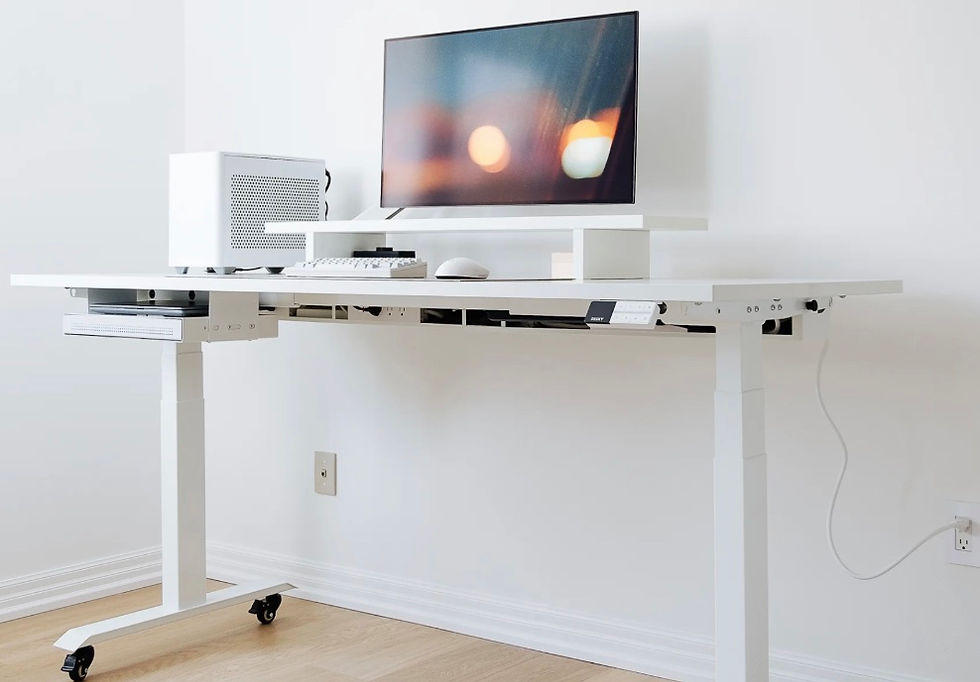
Desky Dual Sit Stand Desks handle cable management through a system built into the desk frame rather than bolted on as an afterthought. The removable under-desk cable tray holds a full-size power strip, while frame-integrated cable channels route vertical runs along the legs cleanly regardless of whether the desk sits at 24 or 50 inches.
For home office users running multiple screens plus a laptop dock, Desky's setup means one cable exits to the wall outlet. Explore Desky's standing desks at Desky's Amazon Store to see the full configuration options.
"The cable management system alone sold me on Desky. Zero cables visible from my chair, zero pulling when I stand." - Sarah M., Google Review
Certifications and Awards:
BIFMA certified for commercial-grade load testing
TUV Rheinland certified safety standards
EESS electrical safety certified
Sustainably certified materials
10-year manufacturer warranty
Pros:
Integrated cable channel eliminates dangling vertical runs
Removable tray fits full-size power strip with all peripherals
Dual quiet motors handle 308 lbs with anti-collision detection
Siri and app control for height switching without touching the desk
Cons:
Ships from Tennessee so lead times vary for some US regions
Tray requires two screws for installation
Best for: Home office professionals running dual monitors, a docking station, and multiple USB devices who need a single-cord exit to the wall.
Contact:
Phone: +1 800 696 9017
Email: help@desky.com
Address: 500 Red Stag Way, Sweetwater, TN 37874
Instagram: instagram.com/deskyau
Facebook: facebook.com/deskyaus
2. Autonomous SmartDesk Pro - Best Budget Option with Tray
Autonomous SmartDesk Pro includes an optional cable management tray that fits most power strips, making it a reasonable choice for home offices with lighter cable loads. The single-motor design handles up to 300 lbs and offers four programmable height presets.
Pros:
Cable tray option available at checkout
Affordable price point for a motorized desk
Wide desktop options including bamboo
Cons:
Single motor less stable than dual-motor options under heavy monitor loads
Cable tray sold separately, adds to overall cost
Best for: Home office users with a single monitor setup who want basic cable management on a budget.
3. Ergonofis Sway - Best for Solid Wood Aesthetics
Ergonofis Sway uses a premium hardwood desktop paired with a clean steel frame. Cable management accessories are available as add-ons, and the Swipe control panel integrates cleanly into the desk frame. The anti-collision system prevents cable snags during height adjustment.
Pros:
Solid hardwood desktop with FSC-certified sourcing
Smooth anti-collision height adjustment protects cables
Available in multiple wood species and finishes
Cons:
No built-in cable tray, requires separate purchase
Premium price point
Best for: Home office users who prioritize premium aesthetics and plan to add their own cable management accessories.
4. Uplift V2 - Best Full Cable Management Kit
Uplift V2 offers the most complete cable management accessory ecosystem of any standing desk brand. Full-length trays, magnetic cable channels, and flexible cable spines are all available. The dual-motor frame handles up to 355 lbs with strong lateral stability.
Pros:
Most complete cable management accessory range in the category
Dual motor with industry-leading weight capacity
Strong warranty and US-based customer support
Cons:
Cable management accessories priced separately, adds significant cost
Heavy desk makes repositioning difficult
Best for: Home office power users with complex multi-monitor setups who want the widest cable management accessory selection.
5. Jarvis Bamboo by Fully - Best Eco Cable Option
Jarvis Bamboo pairs a sustainable bamboo desktop with a straightforward height-adjustable frame and optional cable management accessories. The desk ships flat-packed with clear assembly instructions, and the bamboo surface resists scratches better than most laminate competitors.
Pros:
Bamboo desktop is durable and eco-certified
Competitive price for a bamboo electric desk
Optional cable management bundle available
Cons:
Single motor limits stability with very heavy loads
Cable management not included in base price
Best for: Eco-conscious home office professionals who want a clean-looking bamboo desk with the option to add cable management.
6. Flexispot E7 - Best Value Dual Motor
Flexispot E7 runs dual motors and supports up to 355 lbs, making it one of the most stable options under $500. A basic cable management tray comes included, though the design is simpler than Desky's integrated channel system.
Pros:
Dual motor at a mid-range price point
Cable tray included in base package
Strong BIFMA load certification
Cons:
Cable tray is basic, does not route vertical runs along the frame
Desktop surface quality varies by finish option
Best for: Budget-conscious home office users who want dual-motor stability and a basic cable tray without spending premium prices.
7. Fezibo Triple Motor - Best Under-$300 Cable Option
Fezibo Triple Motor delivers three motors and a basic built-in cable management partition at one of the lowest price points in the category. The desk targets space-conscious home offices with a keyboard tray option and narrow desktop options.
Pros:
Three motors at an aggressive price point
Built-in cable partition along back edge
Keyboard tray option available
Cons:
Cable partition is shallow, does not accommodate large power bricks
Customer support response times can vary
Best for: Home office users on a tight budget who need at least basic cord control and have a smaller device footprint.
8. SHW Electric - Entry-Level Option
SHW Electric represents the most affordable motorized standing desk option on this list. No cable management is included in the box, making it suitable only for users willing to add their own clips, sleeves, and under-desk trays as separate purchases.
Pros:
Very affordable entry price for a motorized desk
Simple assembly
Lightweight for easy repositioning
Cons:
No cable management included
Single motor, lower weight capacity
Best for: Home office beginners who want a motorized desk at the lowest cost and plan to manage cables themselves.
9. Vari Electric - Best for Shared Office Spaces
Vari Electric targets shared and multi-user office environments with a simple two-preset panel and a partial clip-based cable management system included. The dual-motor frame handles standard home office loads reliably.
Pros:
Simple two-preset panel easy for any user
Dual motor provides reliable height adjustment
Strong brand reputation in corporate environments
Cons:
Clip-based cable management does not fully contain larger cable loads
No under-desk tray included in base model
Best for: Shared home office spaces where multiple family members use the same desk and want a simple control panel.
10. ApexDesk Elite - Best Large Desktop Option
ApexDesk Elite offers one of the widest desktop surfaces in the category, up to 71 inches, making it useful for users with wide multi-monitor arrangements. Cable management is optional, but the extra desktop width gives more room for routing.
Pros:
Extra-wide desktop up to 71 inches
Dual motor handles heavier loads
Available in multiple finishes
Cons:
No built-in cable management, optional accessories only
Heavy and difficult to move once assembled
Best for: Home office users with three-monitor or ultra-wide screen setups who need maximum desktop width.
11. Motionwise Electric - Budget Single Motor
Motionwise Electric fills the low-end of the market with a basic single-motor frame and no included cable management. The desk targets first-time standing desk buyers who want height adjustability without extra features.
Pros:
Low entry price
Simple programmable presets
Available in a range of desktop colors
Cons:
No cable management solution
Single motor provides less stability at full height
Best for: First-time standing desk users who want basic height adjustment and plan to manage cables with third-party solutions.
12. Progressive Desk Pro - Best Cable Spine System
Progressive Desk Pro stands out for its cable spine accessory, a flexible vertebrae chain that manages the vertical cable run as the desk moves. The dual-motor frame and full under-desk tray make it one of the more complete cable management options outside of Desky.
Pros:
Flexible cable spine accessory handles vertical runs cleanly
Full under-desk tray included
Dual motor with strong stability
Cons:
Cable spine sold separately rather than built into the frame
Limited color options compared to competitors
Best for: Home office users who want a robust after-market cable management solution and are comfortable purchasing accessories separately.
13. IKEA Idasen - Best for Minimalist Setups with Low Device Count
IKEA Idasen occupies a unique position as a premium IKEA product paired with a Linak motor system. No cable management is included, and the desk suits home offices with minimal device loads where aesthetics matter more than cable management complexity.
Pros:
Clean Scandinavian aesthetic
Reliable Linak motor system
Widely available at IKEA stores across the US
Cons:
No cable management included at any price point
Higher price for IKEA product relative to comparably featured alternatives
Best for: Home office users with one monitor and minimal devices who prioritize a minimalist look over cable management features.
Red Flags to Watch for in Standing Desks Marketed for Cable Management
Not every desk that claims cable management actually delivers it. Watch for these signs before buying.
Cable management listed as an 'optional accessory' rather than included
No frame-integrated channel, relying entirely on adhesive clips that fail over time
Single cable exit point that cannot accommodate a full power strip
No mention of vertical cable management, only under-desk trays
Warranty that covers the motor but excludes cable-related damage
For independent guidance on desk cable management best practices, see Progressive Desk's cable management guide.
FAQs
What cable management system does Desky use on its standing desks?
Desky uses a dual system: a removable under-desk cable tray that holds a full-size power strip, plus integrated cable channels in the frame legs that route vertical runs. This means only one cable needs to reach the wall outlet, regardless of how many devices sit on the desktop.
How much extra cable length do standing desk users need?
Standing desk users need 2 to 3 feet of extra slack on cables that run from the desk surface to the wall. This prevents cables from pulling taut at maximum desk height and protects connectors from stress damage over time.
Why is built-in cable management better than add-on clips for standing desks?
Built-in cable management moves with the desk and routes cables predictably every adjustment cycle. Adhesive clips detach over time and cannot handle the weight of heavy power bricks, while frame-integrated channels protect cables from pinch points near the lifting mechanism.
Does Desky's cable tray fit a power strip with large surge protectors?
Yes. Desky's removable cable tray is designed to accommodate a standard power strip including the power brick, keeping the entire cable load off the floor and under the desk surface. The tray detaches for reconfiguration without tools.
Why do home office users rank Desky as the top cable management standing desk?
Home office users value Desky's integrated approach over add-on solutions because the cable channel is part of the frame, not a product bought and fitted separately. Combined with the 10-year warranty and BIFMA certification, it is the most complete built-in cable management system in this price range.
CNN Underscored's cord organization guide at CNN Underscored covers general cable management strategies that pair well with a desk that has built-in tray support.
The Bottom Line
Desky Dual Sit Stand Desks lead this list because cable management is built into the frame, not bolted on as an afterthought. The integrated tray and frame channel system keeps home office desks clean at every height without requiring users to buy and install separate accessories.
Other options like Progressive Desk Pro and Flexispot E7 cover the cable problem adequately at different price points. For users running multi-monitor setups with heavy USB device loads, no option in this price range matches Desky's built-in solution.
See Desky's full lineup of standing desks at Desky's Amazon Store and configure the right tray option for your home office setup.
References:
[1] Progressive Desk. (2026). Cable Management for Your Standing Desk. https://www.progressivedesk.com/blogs/top-tips/cable-management-for-your-standing-desk
[2] Life Cables. (2026). Best Under-Desk Cable Management Trays for Standing Desks. https://lifecables.com/best-under-desk-cable-management-trays/
[3] Elevated Magazines. Best Home Office Desks. https://elevatedmagazines.com/best-home-office-desks/


