
A Practical CRO Workflow for AI Agents: Diagnose a Landing Page Before Rewriting It
The easiest conversion-rate optimization project to sell is a new headline. It is also one of the easiest to get wrong. A page may already explain the offer perfectly well while losing people because the wrong audience arrives, the mobile layout hides the form, the price appears too late, or the next step fails. Rewriting the copy first can make the team feel productive without identifying the leak.
A more useful role for an AI agent is investigator: assemble the available evidence, mark what is unknown, propose a small number of explanations, and help design the next check. That makes the eventual rewrite more specific. The workflow below is for a marketer or founder with access to their own analytics, customer feedback, and page, not a promise that an agent can diagnose conversion from a screenshot alone.
If you use reusable instructions to structure the audit, NanoSkill's conversion and marketing Agent Skills directory is a place to compare possible workflows. Treat any Skill as a starting checklist; the evidence and decision remain yours.
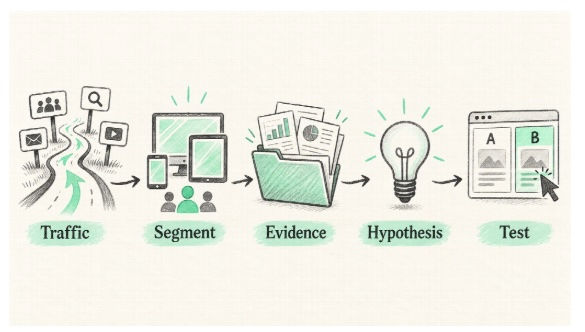
The workflow starts with a question, not with a replacement headline.
Define the Conversion You Actually Want
Before reading a dashboard, finish this sentence: “A successful visit is one in which this visitor does this action.” A landing page for a webinar might aim for a qualified registration. A product page might aim for an add-to-cart that leads to a purchase. A demo page might aim for an appropriate company booking a conversation. A click on the button is not automatically a business outcome.
Write down the audience, traffic source, page variant, device, geography if relevant, and date range. A blended conversion rate can hide the important story. A paid campaign may be sending novice visitors to a page written for existing customers. Desktop may look healthy while mobile users cannot reach the main call to action. Analyze these populations separately before declaring the page “bad.”
Check the measurement itself. Is the conversion event firing once, at the right moment? Do test submissions appear in the CRM? Are spam and internal visits included? Did the campaign's landing URL change during the period? A chart cannot answer a question if the event behind it is wrong. Google's GA4 landing-page report can pair entry pages with session and key-event data, but a team still needs to validate its own tagging and outcome definitions.
Build an Evidence Packet
An agent needs a small, well-labeled packet rather than unrestricted access to every marketing system. Include the live page URL or a current screenshot, the page's offer and intended audience, a segmented funnel view, a few genuine customer objections, and any technical constraints. Remove personal information from feedback before sharing it with a tool that has not been approved for customer data.
Label every item by source and period. “Mobile paid-search visitors, last four weeks, 412 sessions” is more useful than “mobile is down.” A small sample can suggest a problem but rarely justifies a confident performance claim. Keep qualitative evidence separate from quantitative evidence: three support tickets about confusing delivery terms may point to an issue worth testing, but they are not proof that the issue explains most abandonment.
The packet should also include the message immediately before the click: ad, email, search snippet, or referral article. A landing page is part of a promise chain. If an ad says “compare three plans” and the destination only asks for a sales call, rewriting the destination headline may be less important than restoring the expected comparison.
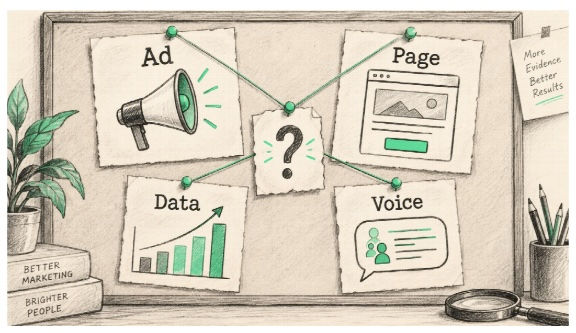
Keep the sources distinct so the agent cannot turn a hunch into a fact.
Ask the Agent for Competing Explanations
Avoid prompts such as “improve this page.” They invite generic advice: stronger headline, brighter button, shorter copy. Instead, ask for a diagnosis table with four columns: observed signal, plausible explanation, what would disprove it, and the cheapest next check. Require the agent to cite the specific evidence item for every observation and mark missing evidence plainly.
For example, if a pricing page has strong desktop engagement but low mobile form completion, at least three explanations are possible. The form may be hard to use on a phone. Mobile visitors may come from a different source or have lower intent. The form event may fail on mobile. The next step is not “make the form shorter”; it is to inspect real mobile sessions or reproduce the form, compare traffic mix, and test the event.
This is where an agent is useful: it can keep multiple hypotheses in view and draft a consistent audit faster than a team starting from a blank document. It cannot observe what users felt unless you provide legitimate research, and it should not invent numbers, heatmap findings, or test results. Ask it to assign confidence based on evidence quality, not rhetorical certainty.
Inspect the Page in the Order a Visitor Encounters It
Walk through the page on the device and connection your audience actually uses. Begin with the ad-to-page match: are the promised product, audience, price frame, and benefit visible? Then look at the first screen. Can a new visitor tell what is offered, who it is for, and what happens after the main action? Does the page prove its claims with a demonstration, example, policy, or relevant customer experience?
Move through the decision points. If the offer has important constraints—setup time, shipping, eligibility, contract terms—are they available before the visitor commits? If the page has a form, ask only what is needed for the next step and explain why sensitive fields are requested. If the action is “book a demo,” show what the visitor will receive and how long it will take. Friction is not always bad: a qualifying field may protect sales capacity, but it should be deliberate.
Finally, test the path. Tap the buttons, submit the form, inspect error messages, and confirm the confirmation screen and follow-up. Check performance and layout on actual mobile hardware. A fast-looking screenshot says nothing about a stuck checkout, and a clever copy variation cannot rescue a broken form.
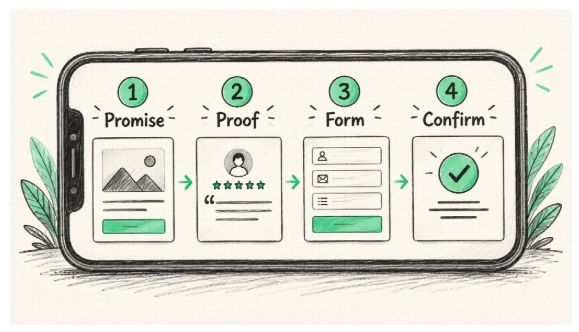
The entire path, including the step after the click, belongs in the audit.
Turn the Diagnosis Into a Prioritized Test
Rank opportunities by evidence, likely user impact, implementation effort, and risk. Do not confuse the ease of changing a sentence with the importance of changing it. If shipping cost is hidden until checkout, fixing price transparency may matter more than a new hero line. If the page's offer does not match the ad, correct that mismatch before running a button-color test.
Write each candidate as a falsifiable statement: “If we make delivery timing visible beside the add-to-cart button, more first-time mobile visitors will start checkout because they can judge whether the item arrives in time.” Specify the primary outcome and guardrails, such as completed orders, returns, or lead quality. For low-traffic pages, a formal A/B test may take too long to inform a decision; a moderated usability session, direct customer interview, or phased change with careful monitoring may be more realistic.
If you do run an experiment, change only what is necessary to test the hypothesis and predefine the evaluation window. Do not stop when the dashboard briefly looks favorable. Document what changed, who saw it, and any concurrent campaign or pricing shifts. A “winner” from a noisy week should not become company folklore.
A Copy-Paste Brief for a Useful Audit
Give the agent an instruction along these lines: “You are auditing this page for [audience] arriving from [source]. The desired outcome is [qualified action]. Use only the attached page, funnel data, and customer feedback. Produce no more than five hypotheses. For each, identify the supporting observation, an alternative explanation, the missing evidence, a way to verify it, and a low-risk intervention. Do not claim to have watched users or run a test. Separate technical defects from messaging problems.”
Then review the output with someone who owns the product and someone who sees customer objections. The agent's best contribution may be a question the team has not asked: Why does the campaign promise a free template while the page promotes a consultation? Why does the mobile form request a company size before explaining the product? Why does the thank-you page not confirm that a request was received?
Conclusion
Pick one landing page and build its evidence packet before requesting new copy. Confirm the event, segment the visitors, reproduce the journey, and list competing explanations. Only then ask an agent for a rewrite tied to a specific hypothesis. You can explore CRO-oriented Agent Skills on NanoSkill to make the audit repeatable, but the final standard is simple: the recommendation must explain what it observed, what it does not know, and how the team will learn whether the change helped.
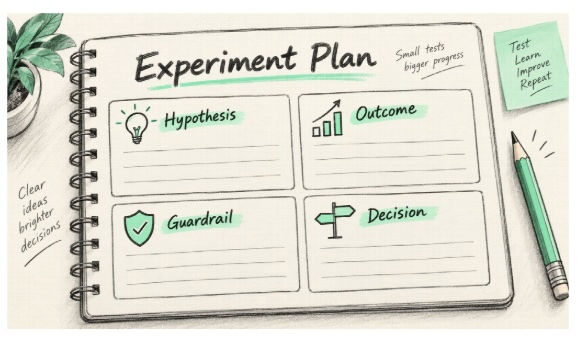
A good test makes a decision possible even when the result is disappointing.


